
Agility Release Notes
Invoice Deviating control
Purpose
Automated invoice approval control will flag any invoice deviating significantly from its originating lead value or previous billing amounts, requiring manual authorization before processing
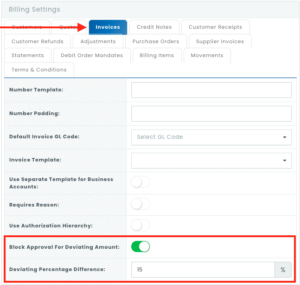
New Permissions: Invoice Deviated Amount Settings and Allow Override Deviated Invoice Approval
New settings in organisation’s financial section, under the invoices tab
The modal popup that shows when trying to override the approval (only shows an error message when the user doesn’t have permission to override)

Release Notes – 24 April 2024
Bug Fixes
Signature Job Step Sizing
The issue with signature sizing enlarging drastically and not fitting the box on the job step has been resolved. Signatures will now fit within the designated box on the job step, ensuring that they are visible and appropriately sized.
Platform Enhancement
Reporting Dashboard and API Field Update
The reporting dashboard on Agility has been enhanced to include the “Offerable type” and “Offerable category” fields from customer billing. These fields are now available for reporting and have been exposed via API for external integration.
Circuit and Location Automation
A new automation has been implemented to link circuits and customer locations. When a customer location is cancelled or deactivated, the associated circuits are automatically deactivated. This enhancement reduces workflow duplication and minimizes potential human errors by ensuring that circuits reflect the status of their associated locations accurately.
Visibility of Fields in Leads Table and Reporting
The “Offerable type” and “Offerable category” columns have been added to the Leads table for improved visibility. Additionally, these fields have been enabled for reporting purposes, allowing users to include them in their reports for better analysis and insights.
Reorder Unpaid Invoices on Receipt Creation
The order of unpaid invoices presented when creating a receipt has been reversed. They are now listed as the oldest invoice first, addressing the issue where they were previously listed as the latest invoice first. This change ensures a more logical and consistent presentation of unpaid invoices, improving user experience.
Suspensions Module – PPPoE Username Inclusion
The Suspension Module now includes the PPPoE username on both the view and the dashboards. This enhancement provides better visibility and management of suspended accounts, including those without PPPoE usernames, which can now be manually suspended on the FNO.
Dashboard Module Inclusion
The highlighted modules that are not available for selection on the Dashboard have been added to the relevant module selections. Additionally, the Refunds module has been enabled for selection on the Dashboard. These enhancements allow for more comprehensive data selection and upload capabilities to the SFTP server
Exposure of the “Ready for Fulfillment” Field on the Dealer Portal
The “Ready for Fulfillment” field has been exposed on the Channel Partner Portal. This enhancement allows dealers to view and manage the readiness status of orders, improving communication and coordination between dealers and the fulfilment process.
Addition of “Use Price Inclusive” Flag to Billing Item Grid & Dashboard
The “Use Price Inclusive” flag has been added to the Billing Item grid and dashboard. This enhancement enables users to conduct revenue leakage reconciliation by providing visibility into whether prices include certain fees or taxes.
Remove Commas from Fields in Dashboard Exports
Commas in dashboard exports to CSV format are now replaced with pipes (|). This enhancement ensures that data integrity is maintained when exporting dashboards, as commas could cause issues with CSV formatting.
Auto Suspension – Cancellation Lead Timing
The timing for creating Cancellation Leads after a configurable number of days has been adjusted to prevent them from being created too soon. This fix ensures that Cancellation Leads are generated at the appropriate time, improving the accuracy and effectiveness of the auto suspension process.
Change Payment Due Date Selection in Contracts
The selection for the payment due date on the payment info tab of the contracts screen has been updated to allow for the selection of days 1-31 instead of specific dates (e.g., 1 April 2024). This enhancement provides users with more flexibility in choosing the payment due date, improving usability and customization options.
Release Notes – 13 April 2024
New Developments
SLA Matrix
Agility now includes an SLA Matrix to manage tickets optimally. This feature allows for pausing the SLA timer when certain elements/aspects of the ticket are in play and provides accurate SLA-based reporting to clients. Key features include flagging ticket status as SLA bound or not, tracking time in status when moving out of non-SLA status back into SLA status, considering the sum of non-SLA status times in calculation of IN/OUT SLA, monitoring time between auto response and agent response, time in escalated status, time in progress, and time between resolved and closed. Additionally, the system does not change the status from Resolved back to In Progress when the customer responds, and it allows for pausing the SLA timer when needed.
EFT Payment Allocations
Agility now supports EFT payment allocations from a particular ERP system. Payments made to a bank account are pushed to Agility, generating receipts in AGIS. The system includes auto-allocation to invoices and reactivation of invoices if they were suspended, streamlining the payment allocation process.
Platform Enhancements
Adjustments Grid – Created Date Field
A new “Created Date” field has been added to the adjustments grid. This enhancement provides users with additional information regarding the creation date of adjustments, improving visibility and tracking capabilities within the grid.
Sanitize Payment Method Data
Payment method data is now sanitized before being saved to the database and before submission to Debit Order. This enhancement ensures that the payment method data is clean and secure.
Device Filtering per Location in Contracts Module
A filtering system has been implemented in the Contracts module to ensure that only devices linked to a specific location are available for selection when adding devices to a contract. This enhancement improves user experience and data accuracy by limiting device selection to those associated with the contract’s linked location.
Transaction Lines View – Include Product Category
The Transaction Lines view has been updated to include the product category. This enhancement provides users with additional information about each transaction line, improving visibility and allowing for better categorization and analysis of transactions.
Transaction Lines View – Include Reason Column
The Transaction Lines view now includes a Reason column. This enhancement provides users with additional context for each transaction line, allowing for a better understanding and analysis of transactions.
Circuit Side A/B Devices – Display Make & Model
Users can now view the specific make and model of Side A/B devices directly from the circuit view, eliminating the need to click on each device for details. This information is automatically populated based on the device added, streamlining the process and providing quick access to device details within circuits.
Customer Billing Import Template – Add Package Field
The Customer billing import template has been updated to include a package field. This enhancement allows for the inclusion of package information in billing imports.
Enable ISP to Change SSID and Password
ISPs can now change the SSID and password for end-users. This enhancement provides ISPs with the flexibility to update WiFi details as needed, improving customer service and user experience.
Contract Type Filter in Dashboards
The “contract type” filter in dashboards has been updated to display contract types as defined in the contracts module settings. This enhancement provides users with more accurate and relevant filtering options based on contract types, improving data analysis and reporting capabilities.
Auto Removal of Billing End Date on Billing Item Activation
When a billing item is updated from inactive to active, the billing end date is now automatically removed. This enhancement streamlines the billing process by ensuring that the billing end date is updated appropriately when the billing item status changes, reducing manual effort and improving accuracy.
Add “Use Price Inclusive” to Billing Item Grid & Dashboard
The “Use Price Inclusive” flag has been added to the Billing Item grid and dashboard. This enhancement allows users to easily identify and filter billing items based on whether they use price-inclusive or not. The dashboarding filter for “Use Price Inclusive” has been updated to allow filtering by true or false values, enabling users to conduct revenue leakage reconciliation effectively.
Bug Fixes
AGIS/IRIS Device Name Changes
A bug was identified where changing a device name in AGIS/IRIS would delete the view and history in Iris, recreating the devices without any history. This issue has been resolved to ensure that device name changes do not trigger the deletion and recreation of devices in Iris, preserving the view and history as expected.
Contracts Reporting – Region Column
The issue with the region column not pulling relevant information into reports in the Contracts module has been resolved. Users can now accurately report on contract data including the region information, improving the completeness and accuracy of contract reporting.
Release Notes – 27 March 2024
New Developments
None
Platform Enhancements
None
Bug Fixes
Movements Grid – Double Scroll Bar Fix
The issue with the double scroll bar on the movements grid has been resolved. Users will no longer encounter a double scroll bar, ensuring a smoother and more user-friendly experience when navigating the movements grid.
Duplicate Transaction Reference on Webhooks
Agility has deployed a change to match billing items using a combination of the ISP reference number and the VR number to ensure the correct billing item or lead is matched. Following deployment, a bulk reverse of receipts and bulk credit notes of incorrect invoices loaded against the account has been completed. This process has helped identify which webhooks from Vumatel generated the invoices, allowing for the re-processing of payment webhooks to generate invoices against the corrected account.
Receipt Count Discrepancy
A bug in Production has been identified where the Receipt Count in the customer grid does not align with the actual number of receipts for that customer. The current receipt count does not include deleted, reversed, or pending receipts. A fix has been implemented to address this issue. However, please note that after the fix, the receipt count may not match the total receipt count due to the exclusion of certain types of receipts.
Debit Order Collections – Message Disappearance
An issue was identified where the Bank Validation Failure Canned Message was not saving the selected Debit Order collection. This bug has been resolved to ensure that the selected message for Bank Validation Failure is saved and persists as expected.
SSID Username Change Issue
Some Channel partners reported that they are unable to change the SSID username, which was previously unavailable. The functionality has been restored, allowing them to customize SSID usernames as needed.
Bulk Create Invoices/Credit Notes
An enhanced functionality has been developed to enable the bulk creation of invoices and credit notes in Agility that allows users to import a transaction list to create invoices using the invoice number sequence in Agility.
Release Notes – 13 March 2024
New Developments
Circuit Mapping
The circuit mapping functionality has been significantly enhanced, allowing users to map additional circuit details like MAX Capacity, Freq, Channel Width, VLAN, Start Date, Ready status, and more directly from workflows. Users can now link devices to locations within workflows, view the product sold to customers on circuit records, and automate the synchronization of active status between linked locations and circuits for improved data consistency.
Platform Enhancements
Transaction Module: Reason Field Availability
The Reason field in the Customer Transaction Module is now available for selection in Dashboards. Previously, the field was not accessible for Dashboard selection, but it is now accessible, ensuring consistency with field availability across different views.
Lead Creation – Updated Date
The Updated Date field now automatically populates with the Created Date upon lead creation. This enhancement ensures that the Updated Date reflects the same value as the Created Date when a lead is initially created, providing accurate and consistent date information for leads.
Leads Dynamic Reporting – Updated Date
The Updated Date column has been added to dashboards for Leads, enabling dynamic reporting based on the date when the lead was last updated. This enhancement provides users with more comprehensive reporting capabilities, allowing them to analyze lead data based on the most recent update timestamps.
Agility Circuits Reporting Module – New Fields
The Customer and Ready Status fields have been added to the Agility Circuits reporting module. These fields were previously unavailable for selection in reports but can now be used to provide additional insights and customization options in reporting for Agility Circuits.
Circuit – Wording Change for “Licensed” Toggle
The wording of the “Licensed” toggle in circuits has been changed to “ICASA License Required,” with the same yes/no toggle functionality remaining. This change aligns the wording with the specific requirement and provides clearer information regarding the licensing status of circuits.
Public Site Logo Redirect
A new setting has been added to public site settings, allowing the logo to be configured to redirect to a custom URL instead of the default homepage of the customer portal. This enhancement provides more flexibility for customization and branding on public sites, allowing businesses to direct users to specific pages or external sites when the logo is clicked.
Circuit Mapping
The circuit mapping functionality has been significantly enhanced, allowing users to map additional circuit details like MAX Capacity, Freq, Channel Width, VLAN, Start Date, Ready status, and more directly from workflows. Users can now link devices to locations within workflows, view the product sold to customers on circuit records, and automate the synchronization of active status between linked locations and circuits for improved data consistency.
Ticket Portal – Ticket Closed Date Filter
The Ticket Closed Date has been added as a filter option in the ATSC ticket portal for customers. This enhancement makes it easier for users to track and view when tickets are closed, improving visibility and management of ticket statuses.
Circuit Dashboards – New Columns
Two new columns, “Active billing MRC excl” and “Active billing NRC excl,” have been added as options when creating circuits dashboards. These new columns provide additional billing information for circuits, allowing users to generate more detailed reports and gain deeper insights into billing data.
Bug Fixes
Active Device Count Graph – All Location Categories
The “Active Device Count” graph now accurately reflects data for all location categories, including END-CLIENT locations. Previously, this functionality was fixed for High Sites but was not working for END-CLIENT locations. This fix ensures that the graph displays accurate and consistent data for all location categories.
Dealer Portal – Attachments
The issue with uploading attachments to client leads from the dealer portal has been resolved. Previously, despite the option being available, attachments were not being uploaded or reflected. With this fix, dealers can now successfully upload documents for clients, streamlining the fulfilment process.